TEXAS CARBINE MATCH RULES - Download a copy of our rules in PDF format.
WHAT GUNS CAN BE USED - For the purpose of our discussion we assume that all items are legal for you to own and you have any/all necessary paperwork.
A carbine for our discussion is any center fire shoulder weapon not larger than 30.06 Springfield in rifle caliber or smaller than 5-seven in pistol caliber. Most shooters will find a semi auto/auto rifle with a removable box magazine works best but, we will allow you to shoot whatever you have so long as it is safe to operate, (no muzzle loaders please). If we get enough interest we will consider expanding the classes to separate manually operated rifles and M1 Garands.
Legally registered short barreled rifles and full auto are allowed but must be fired in semi-auto mode only.
For handguns, any centerfire pistol in .380 ACP or larger and some of our carbine and pistol matches will be rimfire-friendly.
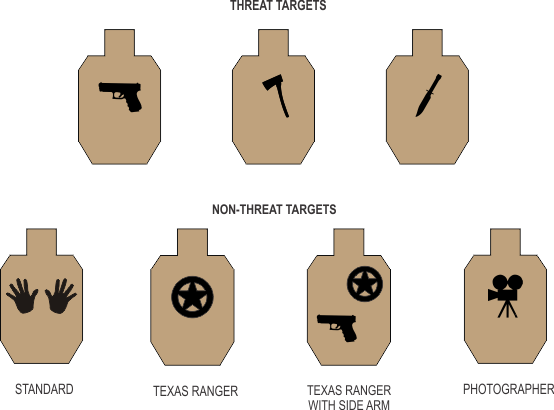
TARGETS - The list of target types used at our matches include standard (and possibly 1/3rd-scale) IDPA paper targets as well as steel knock-down, flashers, and various moving targets. A variety of non-threat targets will also be used and shoot through hits on both threat and non-threat targets will count but only one non-threat penalty will be assessed per target.
SCORING - We use a system of Time Plus similar to Vickers for our rifle, pistol, and shotgun matches and we use 3Gun Nation Rules for our 3Gun match. Vickers is raw time plus points down plus penalties, (1 point down = 0.5 seconds). The following penalties and times will be used:
| CARBINE MATCHES |
Procedural |
|
3 sec |
Non-Threat Hit |
|
5 sec |
| Paper / Steel / Not Hit (> 40yds) |
|
7.5 sec |
| Paper / Steel / Not Hit (> 100yds) |
|
10 sec |
| Paper / Steel / Clay Not Engaged (< 40 yds) |
|
7.5 sec |
| Paper / Steel / Not Engaged (> 40yds) |
|
10 sec |
| Paper / Steel / Not Engaged (> 100yds) |
|
15 sec |
Failure To Do Right (FTDR) |
|
20 sec |
| 3GUN MATCHES |
Procedural |
|
3 sec |
Non-Threat Hit |
|
5 sec |
| Failure to Neutralize (except Heavy Division) |
|
2.5 sec |
Paper / Steel / Clay Not Hit (< 40 yds) |
|
5 sec |
| Paper / Steel / Not Hit (> 40yds) |
|
7.5 sec |
| Paper / Steel / Not Hit (> 100yds) |
|
10 sec |
| Paper / Steel / Clay Not Engaged (< 40 yds) |
|
7.5 sec |
| Paper / Steel / Not Engaged (> 40yds) |
|
10 sec |
| Paper / Steel / Not Engaged (> 100yds) |
|
15 |
Failure To Do Right (FTDR) |
|
20 sec |
TC Scoring
Texas Carbine has always been of the opinion that you should never quit. Something that has occasionally caused us concern is a stage where a shooter could shoot the minimum number of rounds in a very quick time, not hit a target, take the penalties, and win the stage.
To that end we will use what we call, "TC Scoring." Targets not hit or not engaged beyond 40 yards receive a higher penalty, 10 seconds for paper or steel not engaged and 7.5 seconds for paper or steel not hit. For targets greater than 100 yds, those two penalties are 15 and 10 seconds respectively. Also, if a shooter has a gun malfunction, the clock will still be running up to the max time and it behooves the shooter to do his/her best to solve the malfunction and try to finish the stage before reaching the max time.
Finally, the 3GN Rulebook is rather large so it has a separate section. Click here to read the 3GN Rulebook.
-----------
For all Divisions other than "Real Rifle", two hits on paper are required. For Real Rifle, only one hit is required (points down will be scored for all but 0 down zones,) and for all Divisions, steel must fall either fall to score or "ring" for stationary steel. Iin the case of rimfire guns, a "hit" may have to be called but only by the SO.
SHOOT THROUGHS: Shoot-throughs count for both threat and non-threat targets. So, a hit through a threat target into a non-threat target results in a penalty and, a hit through a non-threat into a threat target yields a penalty as well BUT the hit on the threat target is scored, it's not a miss.
MAGAZINE CAPACITY: Magazine capacity cannot exceed the number specified in the table below.
| DIVISION |
|
Maximum Capacity |
| Iron, Tactical, Todd AK |
|
30 rounds |
| Real Rifle |
|
20 rounds |
| Open |
|
Unlimited |
RIFLE, PISTOL, & SHOTGUN MATCH DIVISIONS:
| RIFLE |
|
|
| Iron |
|
Iron sights or one non-magnifying optic |
| Optic |
|
One magnified optic |
| Open |
|
Any combination of optics |
| Real Rifle |
|
7.62x51 caliber or larger with iron sights or non-magnifying optic. |
| "Todd AK" |
|
AK or SKS rifles with iron sights or one non-magnifying optic |
| |
|
|
| PISTOL |
|
|
| Revolver |
|
Any wheelgun |
| Production |
|
USPSA definition |
| Single Stack |
|
" " " |
| Iron |
|
" " " |
| Open |
|
" " " |
| |
|
|
| RIMFIRE |
|
Some matches may be "rimfire-friendly" for either pistol, rifle, or both. For these matches, rimfire divisions will have the same parameters as centerfire pistol and rifle above but with the prefix "Rimfire", i.e., Rimfire Pistol Iron, Rimfire Rifle Optic, Rimfire Rifle Open, etc. |
| |
|
|
| SHOTGUN |
|
|
| Stock Shotgun (Bird Blaster) |
|
- Pump or auto in factory stock configuration.
- Magazine limit of 4 rounds
- Reloads from bandoleer, pocket or hunting vest. |
| Iron |
|
- Side saddles, wrist bands and tactical vests allowed
- No more than 9 rounds in the gun at any time
- No optical sights, speed loaders, or porting allowed |
| Real Tactical Shotgunner |
|
- Pump action only
- Extra ammo may be carried in a side saddle, pocket, bandolier, or shoulder bag only
- No optical sights, porting, or speed loaders allowed - Magazine may not extend more that 1 inch beyond the barrel but in no case will capacity exceed 9 rounds total.
|
| Open |
|
- No limit on magazine capacity
- Optical sights allowed
- Speed loaders allowed
- Barrel porting/compensators allowed |
AMMUNITION - No steel core, armor piercing ammo may be used on any stages with steel targets. For shotgun matches, #6 bird shot or smaller and slugs.
NOISE SUPPRESSION - No suppressors are allowed because Safety Officers would have to hold the shot timer too close to the muzzle for them to function properly.
TACTICAL PISTOL RULES
These rules and ideas may change over time as we discover what works best but for now, the brain trust spent a few hours deciding how we want these matches to be run and we all agreed that the prime directive should be the needs and desires of the shooters. With that goal in mind, we went through the IDPA rulebook and basically removed/changed the things we thought most IDPA shooters consider burdensome or unnecessary and here are some of the highlights:
Divisions: Revolver, Iron, Optic, and Open. Some matches may also be rimfire-friendly which will add Rimfire Pistol Iron, Rimfire Pistol Open, Rimfire Rifle Iron, Rimfire Rifle Optic, and Rimfire Rifle Open.
For all centerfire divisions other than Open, max length of magazine is 140mm. Magazine retention not required and reloads on the move are permitted.
No belt, mag pouch, or holster limit other than no crossdraw or shoulder holsters
No power factor limits
As with our carbine matches, we will be using Vickers scoring as it is the best compromise between marksmanship and speed.
Threat targets may be designated by any weapon painted on the target and non-threat targets will be designated by open hands or any other obvious non-threat symbol.
As stated above, we want these matches to be driven by you, the shooters, so let us know if you agree/disagree with any of the above or, if you think of anything else that you believe we should consider. We want these matches to remain centered around defensive pistol-style scenarios and not be run and gun but, as with our carbine matches, the main goal is to maximize the fun and enjoyment for our match customers.
|